
How to get App
IOS:
Follow the directions below, or click this link: App Store
- On your mobile phone, navigate to the App Store.

- Click on the Search Icon on the bottom right.

- Type in ZebraWeb and click on the search button.
- Click on GET next to the ZebraWeb icon.

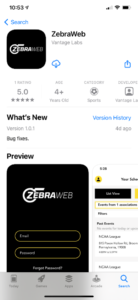
- TouchID, FaceID or iTunes password is required to download.
- Once download, open the application and sign in using your ZebraWeb login credentials.
Android:
Android mobile app is coming soon!