
Setting Mileage Restrictions
-
Sign in to ZebraWeb using your credentials.
-
Click Login.
-
Select the Sports Association (sport portal) you want to set mileage restrictions for. Mileage restrictions must be set individually for each sport portal.
-
Click ZebraWeb Assigning.
-
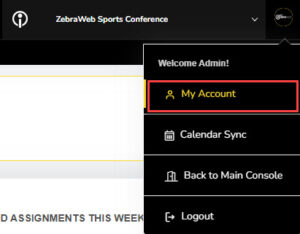
In the top-right corner, hover over your profile image and select My Account from the dropdown.
-
Click Edit in the upper-right corner of the page.
-
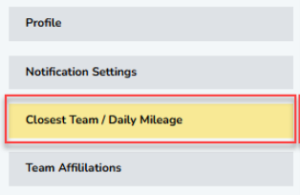
In the left-hand menu, select Closest Team / Daily Mileage.
-
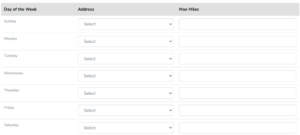
On the next screen, you can:
-
Choose whether you are traveling from your Primary or Alternate address for each day of the week.
-
Set your maximum travel distance for each day of the week.
-
-
When finished, click Save Changes in the upper-right corner of the screen.